Overview
Central management adds an authenticated, two-way channel between your devices and a service you host. Devices register, report that they are online and answer approved read-only questions on demand.
Client reporting tells you what each device reported at its last upload. Central management lets you ask now, compare every device with a baseline you set, and see which App Control policies are actually running across the fleet.
contractVersion 1.0) but may change. Pilot with a test tenant or a small group of devices, with AutoApproveAgents = false. Nothing changes on a device until machine policy opts it in.
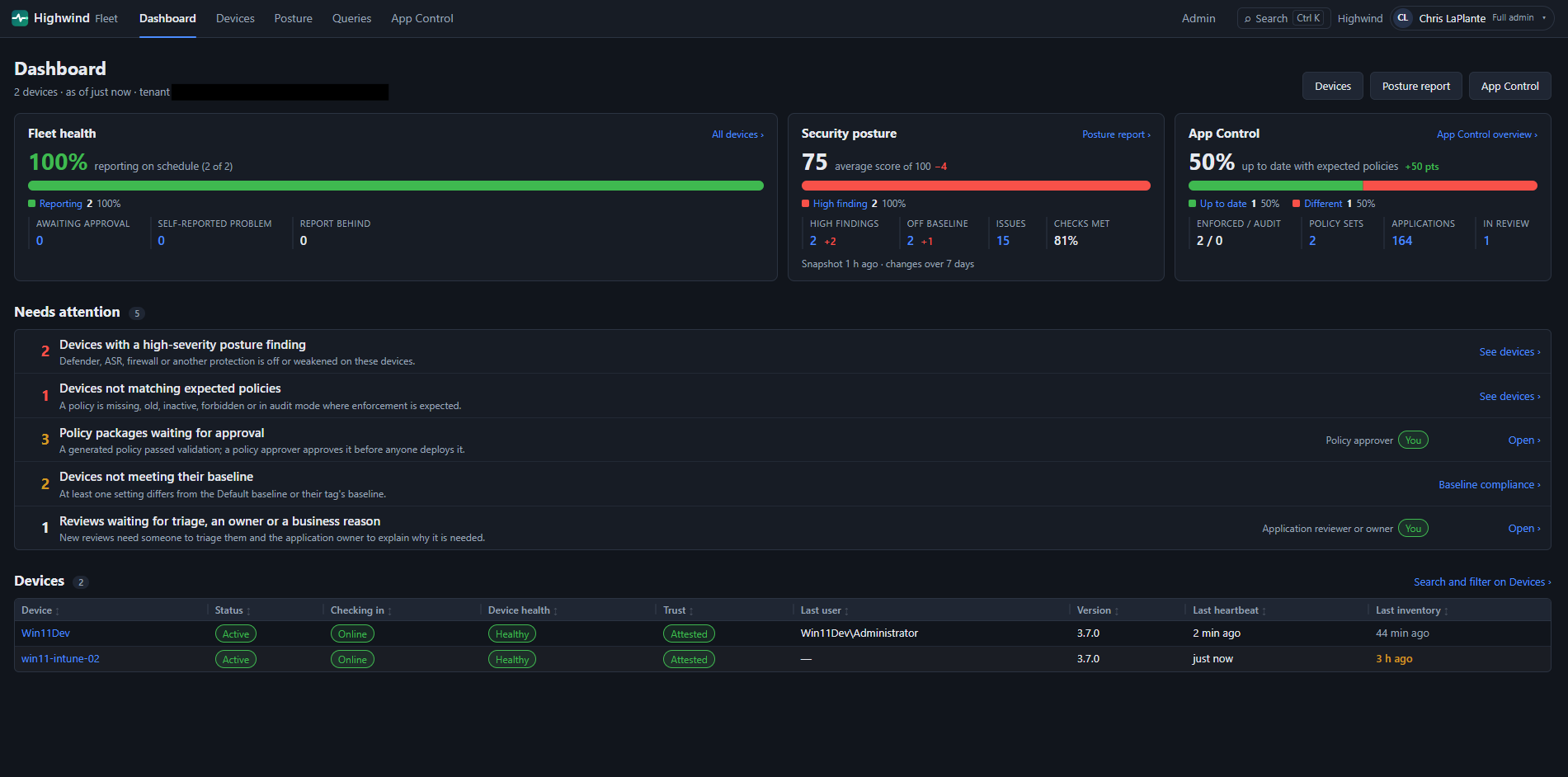 Management Portal dashboard: fleet health, posture and App Control at a glance, with what needs attention first
Capabilities
| Capability | What it gives you | Details |
|---|---|---|
| Device inventory and liveness | Which devices are registered, approved and checking in, with approve, disable and revoke. | Turn on endpoints |
| On-demand questions | Ask one device or many a read-only question and export the answers. | Ask devices |
| Posture and drift | Effective protection state for every device, judged against fixed rules and against the rest of the fleet. | Security posture |
| Baselines and custom queries | A default baseline plus per-tag baselines, and registry, file and service checks you define. | Baselines |
| Access control | Per Entra group: which devices (by tag) and which actions. | Access |
| App Control governance | Policy inventory, drift, application decisions and rule recommendations. | App Control |
Architecture
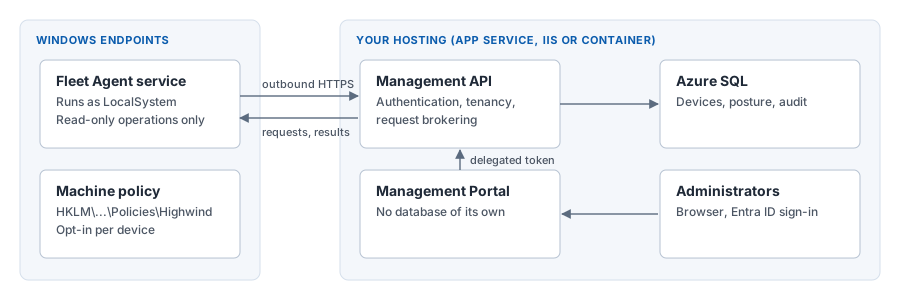
| Component | Description | Ships as |
|---|---|---|
| Management API | ASP.NET Core service backed by Azure SQL or SQL Server. Authenticates every caller, keeps tenants isolated and brokers requests to devices. | Highwind-Management-Api-{version}.zip with fleet-schema.sql |
| Management Portal | Web console for analysts and administrators. Calls the API with the signed-in person's token and stores no data. | Highwind-Management-Portal-{version}.zip |
| Fleet Agent service | HighwindFleetAgent Windows service, so a device reports when nobody has Highwind open. Inactive until policy enables it. | Every Highwind MSI; install with INSTALLFLEETAGENT=1 |
Roles
The API's Entra ID app registration defines three app roles. The values are case-sensitive.
| Role | Assign to | Allows |
|---|---|---|
Highwind.Agent | The identity endpoints use in Entra ID mode. Devices with service-issued certificates receive it automatically | Register, send heartbeats, poll for requests and return answers |
Highwind.Operator | Security analysts | Read devices, posture and App Control data; ask questions and run queries. An Access assignment can narrow this to tagged devices or add administration permissions |
Highwind.Admin | Fleet administrators | Everything an operator can do on every device, plus device lifecycle, enrollment, certificate authorities, baselines, custom queries, App Control settings and Access |
Security properties
- The tenant comes from the token, never the body. Operator request, query and poll bodies carry no
tenantIdoragentId; sending one is400 HW-REQUEST-006. - Another tenant’s device is a 404, not a 403: the API does not confirm it exists.
- No arbitrary commands. A device answers only a fixed list of questions built into the agent: 25 read-only ones, such as Defender status, ASR rules, App Control, firewall state, installed applications and custom checks you author. It never runs a script or command you send. Two further operations exist only for lab machines that opt in with their own policy, change one typed setting under a lease that puts it back, and can be started only by the service. A device is only asked what it advertised.
- One operation takes a definition, and the device decides.
GetCustomCheckResultscarries a check set an administrator wrote. It is validated by the service and again by the agent against rules compiled into it (registry underHKLM\SOFTWAREandHKLM\SYSTEM\CurrentControlSet, files under Program Files, ProgramData and Windows, services), and a device only answers when its own policyFleetCustomChecksEnabledis 1. Operators can run saved custom queries; only administrators, or groups given the Custom queries permission, can write them. - Replays are refused. Every request carries a nonce and a timestamp; heartbeat sequence numbers must increase (
409otherwise). - No authentication bypass exists. Every call except
/health/liveand the two device-identity bootstrap routes needs a valid Entra token, a request signed with a device certificate this service issued, or a client certificate from a CA you registered. - Each device can have its own credential. Entra joined and hybrid joined devices prove who they are with the key Entra gave them at join, then receive a certificate whose key stays in their TPM. One device’s credential cannot speak for another, and revoking a device in the portal stops it within a minute.
Plan a deployment
- Deploy and verify the API and portal. The portal starts with no license, which is expected, and creates its Installation ID. Turn on a pilot group of endpoints after the license is in.
- Copy the Installation ID from Admin → License and request a license file with it (free trial up to one year). The portal’s Request a license button opens the form with the ID filled in. The portal and API need a Highwind Fleet license; the client and Fleet Agent do not. See License.
- Import the license.
- Take the portal tour so your teams know where to look, then set up access, baselines and queries.
- Optionally turn on App Control management.
- Before a wide rollout, review Scale and network protection.
License
The Highwind Fleet portal and management API need a signed license file (.hwlic) from Highwind. The free Highwind desktop client and the Fleet agent on your devices never need one. Terms: Highwind Fleet License.
- Free to try. The portal is free to try at this time, but you still request a license file. Trial length is up to a year and you can reapply when it expires. Requesting it lets us know who is using the portal. This may change in the future.
- Checked on your server. The license is checked with a public key compiled into the release. There is no licensing service, no internet connection, no hardware fingerprint and no phone-home, so it works the same in commercial, government and disconnected networks.
1. Get the Installation ID, then import the license
The Installation ID is created the first time the API starts against its database, so deploy first and request the license second. It stays the same for that database. A new deployment, or a database you recreate, has a new ID, and a license bound to the old ID will be refused with HW-LIC-BINDING-001.
- Sign in as
Highwind.Adminand open Admin → License (/admin/license). With no license this page, your header and the Admin hub still work; every other page explains that a license is needed. Copy the Installation ID. - Click Request a license (shown when there is no license, it is expiring or it has expired). It opens the request form with the ID filled in. Or send the ID to support@laplantelabs.com.
- Choose the
.hwlicfile and click Check file. Nothing is saved yet: the page shows the customer, type, features, device limit, binding, dates and the file’s SHA-256. Compare the SHA-256 with the one in the email or receipt from Highwind. - Click Import this license. The import is refused if the file changed since the check (SHA-256), if it is older than the current license, or if it is already imported. A refused file never replaces the license you have.
- Click Check again at any time to verify the stored license now, and Download summary for a plain-text summary to send to support (no signature, no file).
Every action is in the activity log: LicenseImportAttempted, LicenseImported, LicenseReplaced, LicenseImportFailed, LicenseSecurityRejected (bad signature, unknown key or algorithm), LicenseValidated, LicenseStatusChanged, LicenseFeatureDenied, LicenseLimitExceeded, LicenseSummaryDownloaded and LicenseHistoryViewed.
2. What each state does
| State | People (portal, API) | Devices |
|---|---|---|
| Active | Everything the license includes | Unaffected |
| Expiring soon (30 days; critical at 7) | Everything, with a banner for everyone | Unaffected |
| Expired | Read-only: pages and reports open; changes, queries and imports of anything else are refused with 403 HW-LIC-EXPIRED-001 | Unaffected: heartbeats, inventory and answers continue |
| No license, not yet valid, revoked | Only Admin → License (and the header) work: 403 HW-LIC-MISSING-001 | Unaffected |
| Invalid (signature, binding, schema, key, algorithm) | As No license, with the specific code (for example HW-LIC-SIGNATURE-001, HW-LIC-BINDING-001) | Unaffected |
- Feature not licensed: hidden in the portal and refused by the API with
403 HW-LIC-FEATURE-001(audited at most once per person and feature every 10 minutes). - Device limit reached: approving or reinstating another device is refused with
403 HW-LIC-LIMIT-001; devices already active keep working. - Health:
/health/readynever depends on the license and reports the state in theX-Highwind-Licenseheader for monitoring.
3. Renew or replace
Ask Highwind for a renewal before the expiry date (the banner starts 30 days before); Request a renewal on the License page opens the form with your Installation ID. Import the new file the same way: it replaces the current license at once, and the old one stays in History. A license is normally bound to this installation (its Installation ID) and can also be bound to your Entra tenant ID. Unbound licenses work on any installation.
4. Upgrading from an earlier 3.7.0 build
ManagementRound19 adds the InstalledLicenses and LicensingInstallation tables).
5. Security properties
- Only Highwind can sign. Licenses are signed with RSA-PSS SHA-256 (3072-bit key) held by Highwind. The release contains the public key only; changing one character of a license, or of the stored copy in the database, invalidates it.
- No configuration can add a trusted key in production. Extra keys from
Highwind:Licensing:PublicKeysare honoured only when the API runs inDevelopmentand their ID starts withhighwind-dev-. - The clock cannot simply be wound back. The service remembers the latest time it has seen and judges dates against that; a clock more than an hour behind is reported on the page.
- Strict format. Unknown or duplicate properties, other algorithms, files over 32 KB and unsupported schema versions are refused.
Known limitations in this preview
- Some administration is API only, such as egress grants. The portal guide lists what each portal page does.
- There is no push channel: questions reach a device when it next polls (about every 60 seconds), and expire after 5 minutes.
- The App Control repository stores and versions policies; nothing deploys them to devices yet.
- Application Control Board decisions are governance records: they do not create rules or change any policy. Advanced Hunting evidence is imported from CSV; there is no live Defender or Intune connector yet.
FleetDistributedQueriesEnabledandFleetAiOrchestrationEnabledare reserved;FleetDirectAgentCommunicationEnabledmust not be set.- The agent refuses non-HTTPS management URLs and has no override, so every deployment needs a trusted TLS certificate.
- Tenants can only be created through the
Fleet:Seedconfiguration, and seeding never updates an existing tenant.