See it in action
The management portal, in dark or light mode.
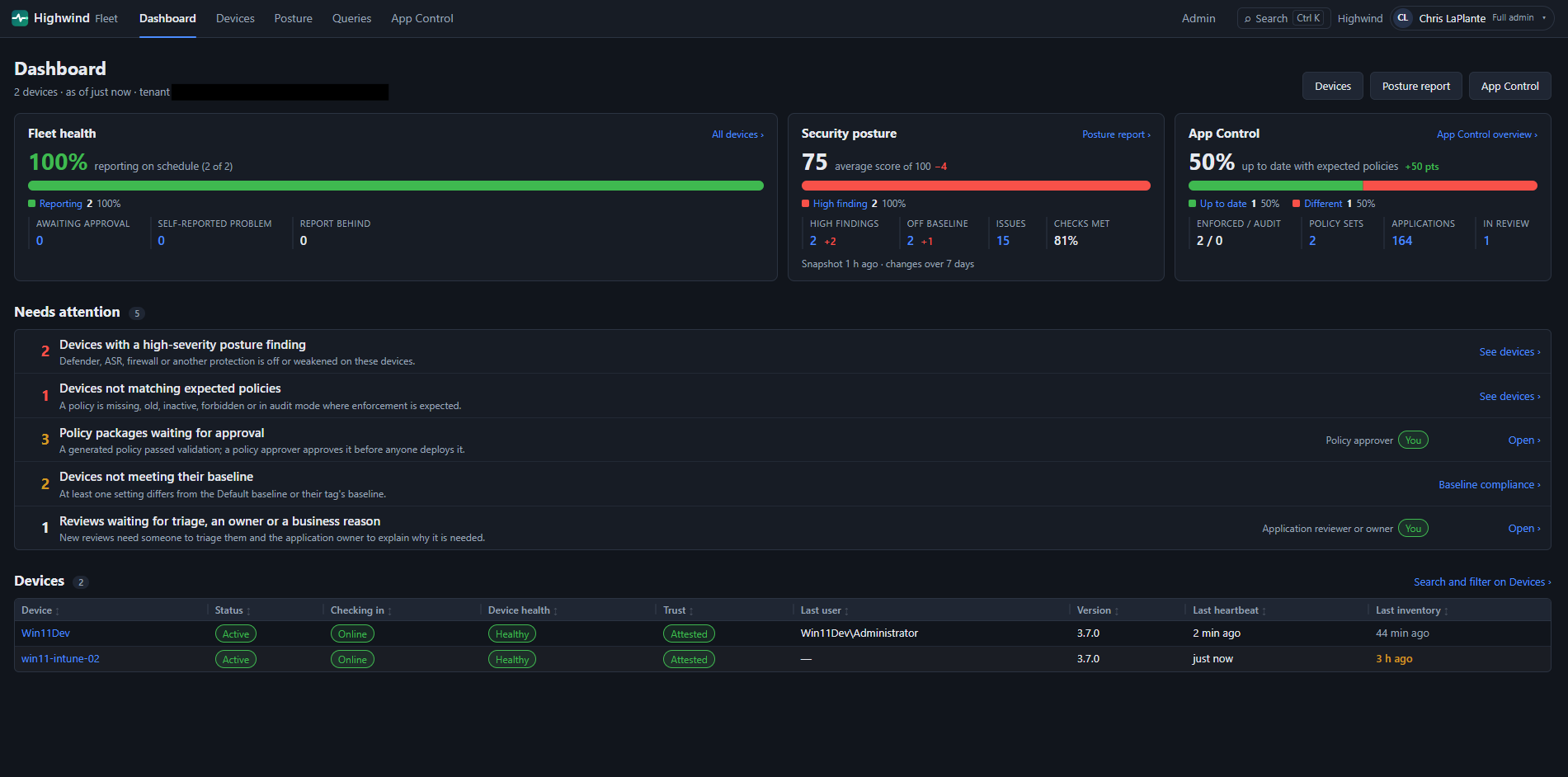 Fleet overview
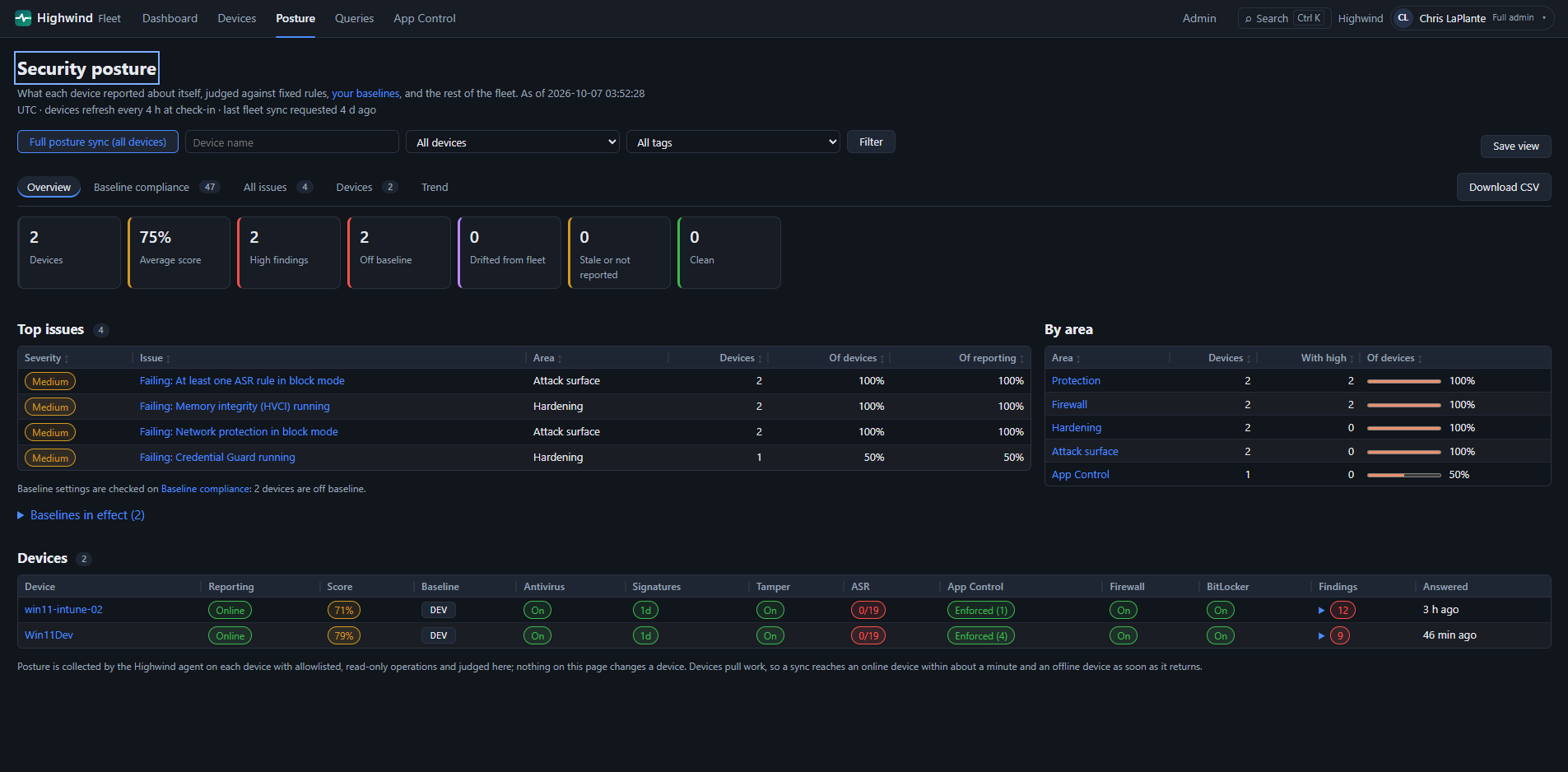 Security posture
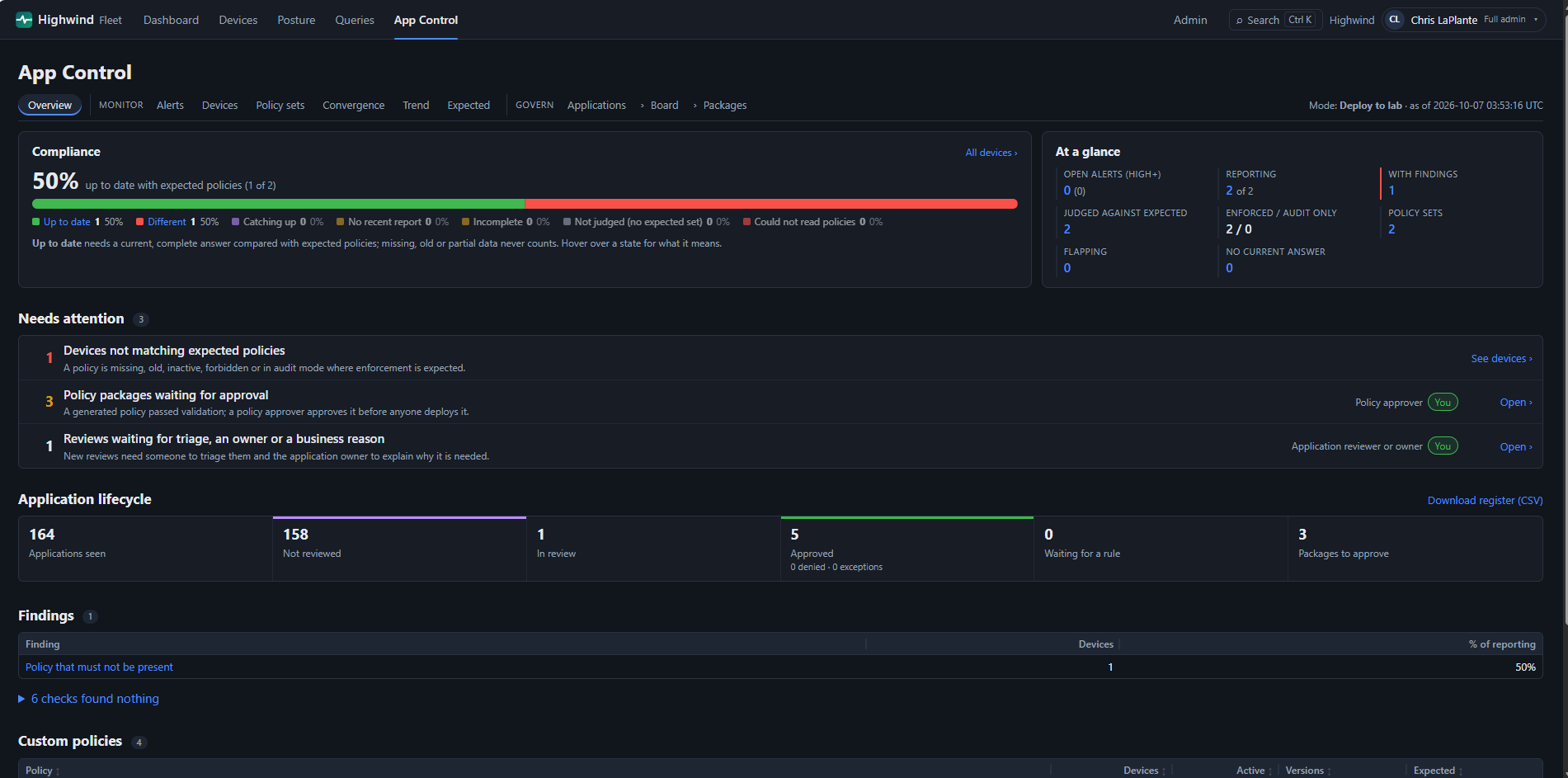 App Control
v3.7.0 Preview Licensed · free trial
One portal for the security state of every Windows device you manage. Posture, App Control and firewall activity across the fleet — running in your own Azure tenant, signed in with your own Entra ID.
✓ Your Azure tenant ✓ Entra ID sign-in ✓ Read-only by design ✓ Nothing sent to LaPlante Labs
The free Highwind Client tells you the truth about one machine. Highwind Fleet gives you that truth for all of them — with the evidence, the history and the audit trail.
The API and portal run on Azure App Service and Azure SQL in your subscription, including Azure Government. Data never leaves your environment, and the license check works offline.
A device only answers operations it has advertised and its own policy allows. The portal cannot change a device, and every request and sign-in is written to an audit log.
Entra groups decide who sees which devices (by tag) and which actions. Admins and operators see only what they should.
Everything below is in the 3.7.0 preview and covered in the documentation.
The effective protection state of every device, judged against fixed rules and against the rest of the fleet. Default and per-tag baselines, and your own registry, file and service checks.
Policy inventory and drift, application decisions with review dates, and rule recommendations built from what actually runs in your environment.
What is blocked, what is allowed and why: troubleshoot a blocked connection, see exposure and risky rules, compare a device with its peers, track rule changes, and export an evidence report.
Send an approved, read-only question to one device or many and export the answers. Devices poll the server; the server never connects to a device.
Every device is tagged Workstation or Server (and Domain Controller) automatically, so baselines, access and comparisons can target them without manual tagging.
Scheduled exports, saved views, a full activity log you can export, and posture trends over time for your reviews.
The management portal, in dark or light mode.
Fleet overviewSecurity postureApp ControlYou host it, so the first install is the part worth planning. It is a script and a checklist, not a project.
.hwlic file for your tenant. A trial takes one email.INSTALLFLEETAGENT=1 or the ADMX templates, and approve them.The Highwind Client and the Fleet agent on your devices are free forever. Only the management portal and API need a license.
Free, including commercial use
Licensed · free trial, up to a year
If a license expires the portal becomes read-only; your devices keep working and your data stays yours. Highwind Fleet is free to try at this time, but a license file is still required, and pricing and terms may change in the future. Terms: Highwind Fleet License.
Everything you need to evaluate, deploy and run Highwind Fleet.
Capabilities, architecture, planning and how to import your license.
Step-by-step Azure and Azure Government setup, endpoint rollout and the self-checking test script.
A tour of every portal page, how to read Changes and Settings, check-in status and Ask Highwind.
Day-to-day use: asking devices, posture, baselines, custom checks, access groups and exports.
Governance, decisions and rule recommendations across the fleet.
Sizing, rate limits and putting a WAF in front of the portal and API.
What is blocked and allowed across your devices, how to turn it on, and how to read it.
Identity, device trust, audit and what data is collected.
Error codes and fixes for sign-in, registration, license and device problems.
For developers and automation: routes, errors and limits.
Release notes for 3.7.0, including the firewall reporting work.
Highwind Fleet 3.7.0 is a preview. It is built and tested for a pilot ring first, and the documentation lists the known limitations. The trial is the right way to prove it in your environment before you commit.
Only to the Azure SQL database in your own subscription. The software does not contact LaPlante Labs, and the license check needs no internet connection.
No. Devices answer approved read-only questions. Policy changes stay in Intune, Group Policy or your existing tools.
Yes. The deployment guide has commands for both commercial Azure and Azure Government (GCC High / DoD).
An Azure subscription, permission to create Entra app registrations, an Azure SQL database and two App Service apps, and devices running the Highwind client with the Fleet agent turned on.
You send the short request form, and we reply with a trial license file sized to your pilot. Tell us how long you need it, up to one year, with no payment details. When it expires, you can reapply for a new one.