About Highwind for organizations
Highwind is a free Windows application that shows how Microsoft Defender for Endpoint is actually configured on a device. Highwind for organizations adds the tools to run it across many devices: reporting, policy control and central management.
It is not a separate product to install. These are capabilities in the same MSI that stay off until you turn them on with policy, and you can adopt each one on its own. For help using Highwind on a single device, see the Client documentation.
Why organizations deploy it
| Outcome | How Highwind delivers it |
|---|---|
| Know the effective protection state of every device | Each endpoint reports what Windows is enforcing after Group Policy, Intune and local settings merge, not only what was assigned. |
| Find drift before an audit or an incident does | Reports are kept as history, so you can see when a device changed and compare it with the rest of the fleet. |
| Keep data in your own tenant | Reports go to a Function App and storage account in your subscription. There is no Highwind cloud service. |
| Control what support staff can do with the tool | Administrative templates restrict pages, exports, remote targeting and changes on managed devices. |
| Answer questions on demand (optional) | Self-hosted central management asks devices approved read-only questions and tracks posture and App Control policy across the fleet. |
Capabilities
Highwind for organizations has three capabilities. Client reporting and policy control are free. Central management requires a Highwind Fleet license.
Client reporting
Scheduled health reports from every endpoint to Azure Table Storage, with a ready-made Power BI dashboard.
Policy control
Group Policy and Intune settings that decide what the Highwind client shows and allows on managed devices.
Central management
A self-hosted API and portal for on-demand device questions, posture, drift and App Control governance.
Architecture
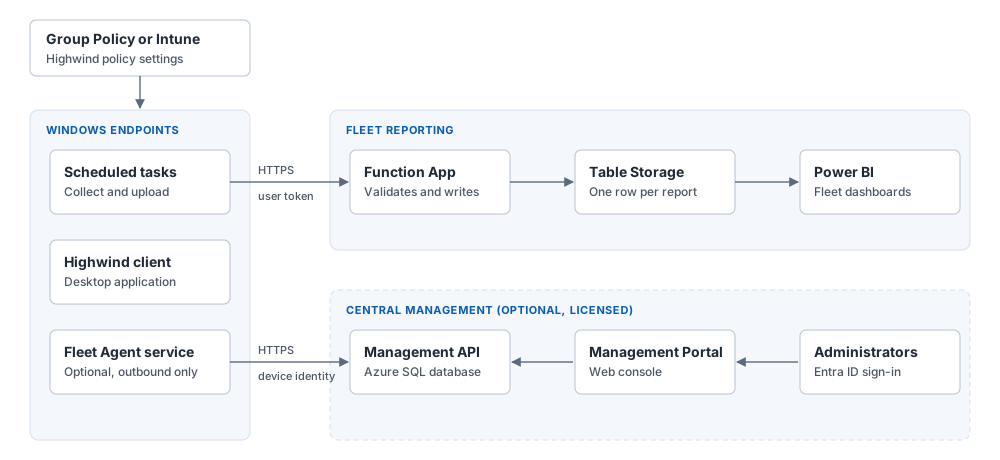
Policy, delivered through Group Policy or Intune, turns each capability on and configures it. Client reporting and central management are independent paths: you can run either, both, or neither.
Required and optional components
| Component | Needed for | Where it runs |
|---|---|---|
| Highwind MSI | Everything | Each endpoint |
| ADMX templates, or Intune settings | Everything (recommended way to deliver policy) | Group Policy Central Store or Intune |
| Function App, storage account, Entra ID app registration | Client reporting | Your Azure subscription |
| Power BI template | Client reporting dashboards (optional) | Power BI Desktop or the Power BI service |
| Management API, Management Portal, Azure SQL | Central management | Your Azure subscription, IIS or a container host |
| Fleet Agent service | Central management | Each endpoint (installed by the MSI with INSTALLFLEETAGENT=1) |
| Highwind Fleet license file | Central management | Imported into the Management Portal |
A newly installed client collects nothing on a schedule, uploads nothing and restricts nothing until policy says otherwise.
Deployment models
| Model | Use it when | Start with |
|---|---|---|
| Policy control only | You want to standardize how the client behaves on managed devices and do not need fleet data. | ADMX templates |
| Client reporting | You want current and historical posture for every device in Power BI. | Client reporting |
| Client reporting and central management | You also want to ask devices questions on demand, compare posture with a baseline and govern App Control policy. | Central management |
All models support Azure commercial and Azure Government. Endpoints must run Windows 10 1809 or later, or Windows 11. Client reporting and central management need devices that are Entra joined or hybrid joined.
Next steps
- Client reporting: how reporting works and what you need before you start.
- ADMX templates: install the templates and choose policy controls.
- Central management: plan a central management pilot.
- Security model: review authentication, data ownership and tenant isolation.